AI for Bookkeepers

Use AI in bookkeeping work without risking client data.

A plain-English starter kit for bookkeepers who want practical AI help before spending hundreds a month on new software.

Use it for client emails, cleanup notes, monthly close summaries, SOPs, and QuickBooks-friendly workflows without turning client privacy into a guessing game.

Built from real bookkeeping experience, not generic AI advice. I spent 20 years inside real business books, so client privacy is not an afterthought here.

Client-data safeOne-time $47 purchaseQuickBooks-friendly workflows
Your judgment is still the product.

Secure checkout opens in a protected payment window. Instant digital download from SoloOS by Sa Roan Holdings. You can review the product and price again before entering payment.

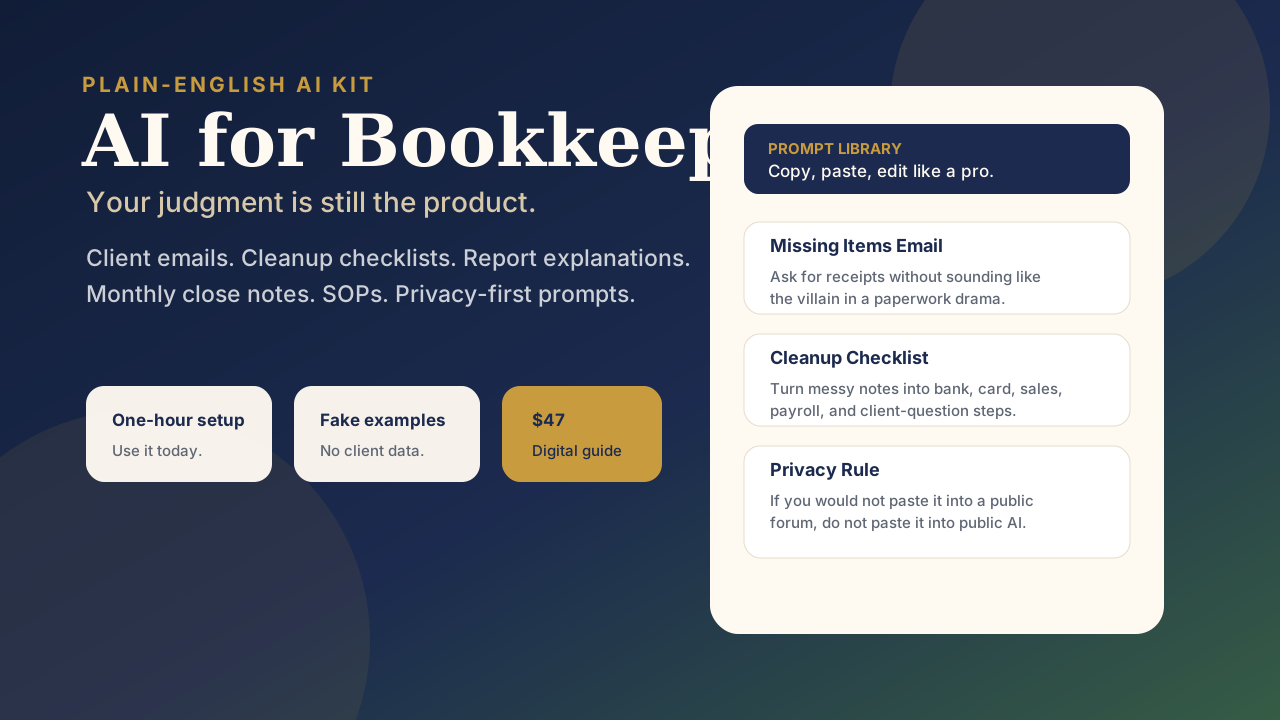
AI for Bookkeepers product preview showing prompt library and privacy rules

Start here

Get the $47 kit first. Setup help is optional.

If you came here from the ad, this is the simple first step: download the starter kit, use the fake-data examples, copy the prompts, and test one safe AI workflow this week. No giant course, no tech lecture, and no client data needed.

Instant downloadCopy/paste prompt libraryFake examples onlyOne-hour setup plan
Get the AI Kit for Bookkeepers - $47

Secure checkout. No client data needed. First 15 feedback copies use code BETABOOKS.

Why it is worth $47

This is not a generic AI prompt dump.

Most prompt packs give you a pile of ideas and leave you to figure out what is safe. Most AI bookkeeping software lists assume you already know what belongs in software, what belongs in AI, and what should stay under professional review.

This kit is the beginner bridge. It shows what AI can help with in bookkeeping, what it should not touch, and how to use it beside QuickBooks Desktop, QuickBooks Online, Xero, or your existing workflow without pasting private client data into a public tool.

It combines the parts a careful bookkeeper actually needs: privacy rules, fake-data examples, client-email prompts, cleanup workflows, monthly close prompts, SOP prompts, QBO-friendly examples, and a one-hour implementation plan.

It is also grounded in 20 years inside real business books, including QuickBooks Desktop and QuickBooks Online experience. The point is not to make AI sound impressive. The point is to help you draft faster without handing client data to a public chat tool.

Current Intuit QuickBooks certifications support the practical bookkeeping judgment behind this kit.
Intuit ProAdvisor QuickBooks Level 1 certification badgeIntuit ProAdvisor QuickBooks Desktop certification badge
Prompt library with guardrails
Fake examples, not client data
QBO-friendly workflow prompts
One-hour implementation plan

Tool map

If you are comparing AI bookkeeping tools, start here.

QuickBooks, Xero, Dext, AutoEntry, FreshBooks, Zoho Books, and full-service bookkeeping platforms can all have a place. This kit does not replace them. It helps you use AI safely around the language, workflow, and client-communication parts of bookkeeping.

Use software for the books

Bank feeds, reconciliations, invoices, payments, reports, audit trail, payroll records, and tax settings belong in accounting software and your formal review process.

Use AI for drafts and structure

Client emails, cleanup checklists, report explanations, monthly close notes, SOP drafts, and sanitized workflow planning are where AI can save practical time.

Use judgment for decisions

Categories, tax treatment, compliance, payroll, owner pay, client advice, and anything you must defend later still need professional review.

QuickBooks-friendly examples

Designed for real bookkeeping workflows.

The kit includes examples you can adapt around QuickBooks Desktop, QuickBooks Online, or another bookkeeping system without exposing client files.

QBO missing receipt email Ask clearly

Draft a client email asking for missing receipts, unclear transfers, and transaction explanations using sanitized details only.

Cleanup status note Explain progress

Turn messy cleanup notes into a calm client-facing update: what is reviewed, what is missing, what happens next.

Report explanation Plain English

Draft a month-end summary after you review the numbers, without letting AI make tax, legal, or category decisions.

Read a real piece before you buy

This is the standard inside the kit.

This preview shows the voice and safety standard, not the full prompt library. The paid kit is the working system: the copy/paste prompts, fake-data examples, cleanup workflows, monthly close prompts, SOP prompts, QuickBooks-friendly examples, and one-hour implementation plan.

This guide was written by a bookkeeper with twenty years of experience across construction, automotive, logistics, and retail businesses. It is not written by a tech person explaining AI to you. It is written by someone who has spent two decades chasing missing receipts, explaining reports to business owners who did not want to hear bad news, and rewriting the same client reminder email enough times to have it memorized.

Before the kit gives you prompts, it gives you the rule that matters most:

When using AI, your first job is to protect the client. That does not mean you can never use AI. It means you sanitize the details.

Real informationSafer replacement
Client nameClient A
Vendor namesVendor 1, Vendor 2, software subscription
Bank account numberOperating account
Employee namesTeam Member 1, Owner, Contractor
Exact private document detailsMissing March statement, missing payroll report, missing receipt

That is what you are buying: practical prompts, but with the guardrails a real bookkeeper needs.

Get the AI Kit for Bookkeepers - $47

The problem

Most AI advice is not written for the person doing real client work.

Bookkeepers do not need generic prompt lists, tech jargon, or advice that ignores client privacy. You need practical examples for the work that actually eats your time.

Start with the free safety guide

Not sure what is safe to ask AI? Read the practical guide first: seven ways to use ChatGPT for bookkeeping work without exposing client data.

Read the Safe-Use Guide

Use the client email templates

Steal the reusable language for missing receipts, uncategorized transactions, cleanup updates, scope boundaries, and monthly summaries.

Get the Templates

Blank-page work

Client emails, reminder notes, report explanations, and monthly close summaries get easier when AI gives you a strong first draft.

Messy-note work

Cleanup notes can turn into clear checklists grouped by bank, credit card, sales, payroll, client questions, and final review.

Privacy-first work

The kit shows what not to paste into AI, how to sanitize details, and where your professional judgment still has to lead.

Screenshots and examples

Open it, copy a prompt, use it today.

The kit is built for action: fake bookkeeping data, copy/paste prompts, checklists, and a one-hour plan.

Prompt example Missing items email

Write a friendly, professional email asking for the missing items below. Keep it clear, brief, and not scolding.

Missing items:
- March bank statement
- Receipt for $214 office supply purchase
- Explanation for a $600 transfer
Safety rule Protect client trust

If you would not paste it into a public forum, do not paste it into a public AI chat.

Client name -> Client A
Vendor name -> Vendor 1
Bank account -> Operating account
Employee name -> Team Member 1
Cleanup workflow Turn fog into steps

Ask AI to group cleanup notes by bank, card, sales, payroll, owner questions, and final review.

Do not make decisions for me. Add a section called "Questions to ask the client."
One-hour plan No giant course required

Draft one email, edit it, turn one messy note into a checklist, create one review prompt, save the best version.

AI is the assistant. You are the bookkeeper.

What you get

A starter kit for careful, practical AI use.

Included

  • Plain-English AI starter guide for bookkeepers
  • Copy/paste prompt library
  • Client privacy and sanitizing rules
  • Fake bookkeeping examples
  • Missing-items email prompts
  • Cleanup checklist prompts
  • Report explanation prompts
  • Monthly close and SOP prompts
  • One-hour implementation plan

Built by a bookkeeper, not a tech guru

This is not about sounding impressive. It is about getting through client work with fewer blank pages, fewer repeated explanations, and fewer "where do I even start?" moments.

AI is useful, but only when it respects the part of the work that still belongs to you: judgment, privacy, and client trust.

Optional setup add-on

Want the kit turned into three working AI workflows?

The $297 Safe AI Workflow Setup is done-with-you implementation for bookkeepers who want a practical, client-data-safe starting system instead of another course to finish later.

What you get for $297

  • AI for Bookkeepers starter kit included
  • Short intake to choose the three workflows that matter most
  • One setup session focused on your workflow, not private client files
  • Three reusable AI workflows: missing-items emails, cleanup-note checklists, and monthly close summaries
  • Reusable prompt/workflow notes you can keep using after the setup
  • One follow-up email for clarification after the setup

Best fit: bookkeepers who want help implementing safely this week, not people looking for a full AI course or bookkeeping software migration.

Start Setup - $297

Secure checkout. After purchase, you receive intake and scheduling instructions. If the intake shows this is not the right fit before setup work begins, I will refund it.

Privacy first. Scope clear.

No client names, account numbers, payroll details, tax IDs, vendor history, bank data, screenshots, passwords, or private client information go into public AI tools.

This setup is for workflow, communication, and organization support only. It is not tax, legal, accounting, financial, compliance, payroll, reconciliation, or transaction-categorization advice.

Not included: transaction categorization, reconciliations, tax decisions, client-file review, payroll review, compliance review, bookkeeping cleanup, software migration, or storing private client records in AI tools.

Simple process: buy the setup, complete the intake, schedule the setup session, leave with three reusable workflow starting points.

Ready now

Get the AI Kit for Bookkeepers.

A plain-English guide, prompt library, privacy rules, fake examples, QuickBooks-friendly workflows, and one-hour implementation plan for $47.

I also use SoloOS to run my own business finances, decisions, and product work. If you want the operating system behind the scenes, start with the Business Control Center.

Get the AI Kit for Bookkeepers - $47

Secure checkout. Instant digital download. First 15 feedback copies are free with code BETABOOKS. If the kit is not useful for your bookkeeping workflow, email hello@mysoloos.com within 30 days and I will make it right or refund it.

First 15 feedback copies are free with code BETABOOKS.Get the AI Kit for Bookkeepers - $47